

Security First

With version 8, and after 35 years of development, Office Maker continues to rejuvenate and strengthen itself. Our software confirms its position at the forefront of technology, security, and ease of use. Version 8 brings many new features, the main ones of which are presented here.
E-banking connection via EBICS 3.0


The EBICS 3.0 standard is supported by most Swiss and European banks and enables automatic connection to your e-banking.
You can receive your debit payments, execute your credit payments and salaries, or obtain your bank statement with a single click. EBICS is therefore available in all three programs, offering greater efficiency and convenience.
We have made this feature highly secure with complete digitization of transfers (no local storage) and strong certificate encryption. Only duly authorized users will be able to perform these operations.
Security improvements
The security of your data is our priority.
For several years now, each major version of Office Maker has brought new enhancements. Version 8 is the culmination of our goals in this area.
Office Maker is the only Swiss ERP to use the QUIC protocol, which prevents any interception of communications between client and server, with a strong encryption key that is renewed at least once a month and is unique to each server.
Our servers, their backups, and all our employees are based in Switzerland. None of your data leaves Switzerland.
For both cloud and local server versions, Office Maker is one of the few Swiss solutions to use dedicated client software rather than a web browser to connect to the server. This not only allows for superior performance and greater ease of use, but also better security.
.jpg)

New features in version 8:
-
Two-factor authentication via email. With this option, a six-digit authentication code is sent by email after the password is entered.
-
Two-factor authentication via TOTP. This option uses a free TOTP app on the user's smartphone to provide the login code after the password is entered. This allows for biometric authentication, as smartphones are generally protected by facial recognition or fingerprint recognition.
-
Protection by identifier of workstations authorized to log in. This option is less restrictive than the previous two and has the advantage of preventing any connection from an unauthorized computer, even if the password has been guessed or disclosed.
New REST module
Office Maker 8 offers a new REST module available in all three programs in the range, in cloud and local server versions, in Standard or PRO versions.
This is a very important development in our programs. Our REST API (Application Programming Interface) will allow other applications or web apps to connect easily and securely to our server versions to read or write data in real time, without having to go through import or export files.
This opens up a huge range of possibilities, such as linking to EDM applications or time tracking software or any other specific software, custom development by third-party programmers of peripheral applications, or opening up to artificial intelligence. All the special functions of the integrated spreadsheet are also available via REST.

Detailed documentation for programmers is available.
Multiple modification dates

Version 8 provides much more information and offers better traceability of the current status of the file.
The exact date and time of creation, as well as the author of the creation, are always retained, along with the last ten modifications.
The user mentioned may be a person or a REST account. A Type is associated with each step to distinguish, for example, between manual or automatic entries or data imports.
Certified for macOS Tahoe and Windows 25H2

Our software is optimized for the latest processor architectures and will run optimally on recent computers.
The software icons have been modernized and adapted to the dark or transparent modes of macOS Tahoe.
Version 8 continues to run on the same configurations as version 7.4, except on Mac, where the minimum system requirement is now macOS 13 Ventura.
See our Recommended Environment document for more details.
Multiple fiscal periods in a single file
Finance 8 provides instant fiscal year changes and simultaneous multi-user work on different fiscal periods.
Screen extracts can span multiple fiscal periods, making it easy to find a specific entry, even from the distant past. Creating a new fiscal period or updating existing ones is also instantaneous.



The fact that all periods are grouped together in a single data file simplifies storage and backups. A new Exercise Manager allows you to retrieve archives from previous years and consolidate them into the same file.
This lays the foundation for a multi-company version in a single file, which is in preparation for 2026.

Swissdec 5.3 certified
Staff 8 is one of the first software programs to be certified for Swissdec 5.3. This adapts the program to the new legal provisions concerning the taxation of French cross-border workers, which will come into force on January 1, 2026.

The duration of teleworking or assignments abroad can be easily communicated, and receipts will also include this information.
We therefore recommend that you create your 2026 financial year using version 8.
Spreadsheets more powerful than ever

Office Maker Business and Finance PRO feature a powerful built-in spreadsheet program that can perform calculations on your data in real time. This means that your spreadsheets are automatically updated based on your company's activities.
Here are some of the new features in the spreadsheet program in versions 8:
Charts
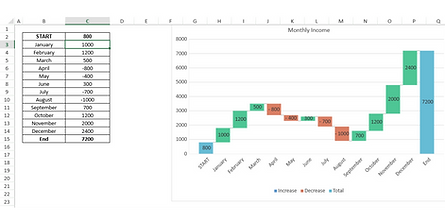
A new chart type called “Waterfall” is available. This chart type is particularly useful for displaying an initial value, intermediate values, and a final value, such as sales over time.
Spreadsheet information
In the File tab, a new Info command displays various information about the spreadsheet, which you can also add to.
Copy and paste
The Paste Special function offers a wide range of options: paste a formula, paste a value, paste a format, paste a comment, paste everything except borders, etc.

Moving rows and columns
In the general spreadsheet settings, a new option allows you to move a row or column by simply dragging its header.
Print settings
In the print settings dialog box, on the Sheet tab, a new checkbox allows you to display borders around the spreadsheet area.
For line charts, it is now possible to obtain smoothed curves.

Charts can now be based on non-contiguous ranges of cells. Select additional ranges by holding down the Command key (Mac) or Control key (Windows).

This chart is generated from columns B, D, and F.
VAT management on receipts

Many companies use the cash basis method (consideration received) because of its simplicity.
This means that invoices and credit notes are no longer sent to the accounting department, but only payments with the corresponding expense or income accounts, as well as VAT due or recoverable. This involves manually entering debtor and creditor positions at the end of the accounting period.
If you are currently using the invoicing method (agreed consideration), we recommend that you do not change, as this method offers much better visibility of the day-to-day accounting situation, including changes in accounts receivable and accounts payable balances.
Version 8 will be gradually rolled out starting in mid-November 2025.

